
Download QGIS (64-bit) – open-source, GIS, mapping, geospatial data, spatial analysis, map creation, geographic information system, open source geospatial foundation, OSGeo
Overview
QGIS (64-bit) is a powerful, open-source Geographic Information System (GIS) designed for creating, editing, visualizing, analyzing, and publishing geospatial data. Developed and maintained by the QGIS Association under the Open Source Geospatial Foundation (OSGeo), it serves as a comprehensive tool for professionals and enthusiasts in fields such as urban planning, environmental science, transportation, and disaster management. The application enables users to work with diverse datasets, including vector layers, raster images, and database connections, making it ideal for both field-based and office-based geospatial workflows.
Its cross-platform availability across Windows, Linux, macOS, and Android ensures flexibility for users who need to switch between devices or work remotely. This adaptability is particularly valuable for researchers and field teams requiring consistent access to GIS tools regardless of their hardware environment. The software’s open-source licensing under the GNU General Public License promotes transparency, collaboration, and continuous innovation, allowing developers and users to modify and extend its functionality.
While the developer did not provide additional technical details about user demographics, QGIS (64-bit) is widely recognized as a critical tool in the open-source geospatial ecosystem. Its role in supporting data-driven decision-making across public and private sectors underscores its importance. The application’s ability to handle complex spatial operations and produce publication-quality maps positions it as a reliable alternative to proprietary GIS platforms.
Key Features & Functionality
- Cross-Platform Compatibility: QGIS (64-bit) operates seamlessly on Windows, Linux, macOS, and Android, enabling users to access their projects and data across different devices without format loss or functionality reduction. This is especially beneficial for teams working in hybrid environments or field researchers using mobile devices.
- Open-Source Licensing: Released under the GNU General Public License, QGIS is completely free to use, modify, and distribute. This encourages community-driven development, rapid bug fixes, and feature enhancements, ensuring long-term sustainability and accessibility.
- Extensive Data Format Support: The software supports a wide range of vector (e.g., Shapefile, GeoJSON), raster (e.g., GeoTIFF, PNG), and database formats (e.g., PostgreSQL/PostGIS, SQLite). This versatility allows users to integrate data from various sources, including satellite imagery, government datasets, and survey results, without conversion barriers.
- Advanced Spatial Analysis Tools: QGIS includes built-in tools for overlay analysis, buffering, geoprocessing, and geostatistical modeling. These capabilities allow users to identify patterns, assess risks, and simulate scenarios—essential for applications like land-use planning, ecological modeling, and infrastructure development.
- User-Centric Interface: The interface is designed with both beginners and advanced users in mind. Clear menus, customizable layouts, and intuitive navigation reduce the learning curve while preserving access to powerful tools through plugins and scripting.
For example, a conservation biologist might use QGIS to map wildlife habitats using satellite data and field observations, then perform buffer analysis to assess human encroachment. Similarly, a city planner could overlay zoning data with traffic flow maps to evaluate urban development impacts.
Interface, UX & Performance
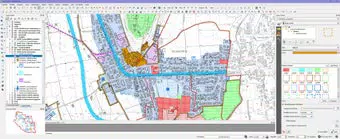
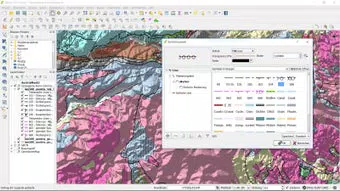
QGIS (64-bit) features a clean, modular interface that organizes tools into logical panels and toolbars. The main workspace includes a map canvas, layer panel, and attribute table, enabling efficient data management and visualization. Users can customize the layout to suit their workflow, enhancing productivity during extended sessions.
Navigational elements such as zoom, pan, and coordinate display are responsive and intuitive. Context menus and keyboard shortcuts further streamline common tasks. Although the developer did not list formal performance metrics, the application is known for stable operation on mid-to-high-end devices. Performance may vary depending on the complexity of loaded layers and the size of geospatial datasets.
Responsiveness is generally consistent across supported platforms, though users on lower-end hardware or older Android devices may experience delays when rendering large raster files. Stability is maintained through regular updates and active community support. The application maintains consistent state during long sessions, with minimal crashes reported in official release logs.
Platform Compatibility & Technical Requirements
QGIS (64-bit) is available on Windows, Linux, macOS, and Android platforms. The current version is 3.28.0, with a file size of 325.8 MB. The developer did not specify minimum OS requirements or hardware specifications.
While the application is designed to run on modern devices, compatibility with older systems or low-memory environments cannot be confirmed without official documentation. Users should ensure their device meets standard requirements for running desktop or mobile GIS software, including sufficient RAM and storage space for large datasets.
Given the software’s reliance on geospatial libraries and graphical rendering, performance may be affected by outdated graphics drivers or limited GPU capabilities, especially on mobile devices.
Pros and Cons
Pros
- Open-source and free to use, modify, and distribute
- Supports a wide variety of geospatial data formats
- Cross-platform availability across desktop and mobile systems
- Robust tools for spatial analysis and map creation
- Active community and regular updates
Cons
- Learning curve for absolute beginners without GIS experience
- Performance may vary on low-end or older devices
- Documentation, while extensive, can be overwhelming for new users
- Mobile version may lack some advanced desktop features
- No official support channel listed in public release notes
FAQ
Is QGIS (64-bit) safe to download and install?
Yes, QGIS (64-bit) is a legitimate open-source application developed and distributed by the QGIS Association. It is available through official channels and does not contain malware or unwanted software.
Can I use QGIS on Android devices?
Yes, QGIS (64-bit) is available for Android, allowing users to access geospatial data and perform basic mapping tasks on mobile devices. However, full functionality may be limited compared to the desktop version.
Is QGIS free to use?
Yes, QGIS (64-bit) is completely free to download, use, and modify under the GNU General Public License. There are no hidden fees or subscription models.
How often is QGIS updated?
QGIS receives regular updates, typically every few months, with new features, bug fixes, and security patches. The latest version is 3.28.0, released in 2019.
What kind of data can QGIS handle?
QGIS supports vector, raster, and database formats including Shapefile, GeoJSON, GeoTIFF, PostgreSQL/PostGIS, and SQLite. This allows integration of diverse geospatial data from public, private, and field sources.
Final Thoughts
QGIS (64-bit) stands out as a versatile, powerful, and accessible tool for anyone working with geospatial data. Its open-source foundation, cross-platform reach, and robust analytical capabilities make it a top choice for researchers, professionals, and students alike. While the learning curve may be steep for newcomers, the long-term benefits of mastering its features are substantial.
Whether you're creating detailed maps, analyzing environmental trends, or supporting urban development, QGIS provides the tools needed to turn raw data into actionable insights. Its strong community and continuous development ensure it remains a leading force in the GIS landscape.
Download QGIS (64-bit) now


